Microsoft is hosting a free jump start for those looking to upgrade their current Windows 2008 certification by taking exam “70-417 Upgrading Your Skills to MCSA Windows Server Windows Server 2012”.
I’ve attended some jump starts in the pasts and I really like them, so don’t miss out. Even though I’m already certified, I will be attending it as well. You will always learn new stuff AND you get the chance to get answers to any questions you still have.
Tags: 70-417, 70-417 Upgrading Your Skills to MCSA Windows Server Windows Server 2012, Free, jump start, Server, Upgrading Your Skills to MCSA Windows Server Windows Server 2012"., Windows, Windows 2012, Windows 2012 Server, Windows Server 2012
When I tried to include a RSS feeds web part to my public sharepoint site just the way I had done many times on intenal sharepoint sites, I found out that the RSS viewer web part was not available.
After searching the internet I found out why this was the case and I also found a workaround using a custom solution/webpart.
Even though it is possible to use RSS feeds this way on my public sharepoint site, it is not what I expected. In my opinion an RSS feed web part is such a fundamental part of websites nowadays that it should be available by default in Office 365 / Sharepoint online.
I hope that this will be corrected in the upcoming release of sharepoint (2013) for Office 365, but the preview still doesn’t provide this capability unfortunately:

Tags: Cloud, ICT, Learning, Microsoft, Office 365, Public Cloud, rss, rss feed, RSS Feed Webpart, Sharepoint, Sharepoint online, Tutorial, Tutorials, web part, webpart
When you first create a public site collection in Office 365 / Sharepoint online you get a default website that looks like this:

I personally prefer the Sharepoint 2010 site look:

To change the layout, follow the instructions in this blog post:
http://blogs.msdn.com/b/sharepoint__cloud/archive/2011/12/22/change-sharepoint-online-public-site-to-look-like-a-sharepoint-2010-site.aspx
Please check my website http://www.bjornhouben.com to see what it can look like after some minor customizations.
Tags: design, layout, Microsoft, Office 365, Sharepoint, sharepoint 2010, Sharepoint online, Sharepoint public site, Sharepoint site, site
At November 23rd the 1st Dutch Powershell User Group (DuPSUG) meeting will be held in November at Master IT in Eindhoven for free.
Sessions:
- Using Windows PowerShell 3.0 to manage the remote Windows 8 workstation
Ed Wilson (Microsoft Scripting Guy)
- PowerShell and WMI
Richard Siddaway (PowerShell MVP)
- What’s new in PowerShell 3.0
Bert Wolters (Microsoft Certified Trainer with Master it Training)
- Protect your PowerShell scripts with version control
Stefan Stranger (Senior Premier Field Engineer at Microsoft Netherlands)
- From command, to script, to function, to advanced function, to tool.
Jeff Wouters (freelance Technology Specialist at Methos IT)
Read more about the meeting, the sessions and the speakers here: http://www.dupsug.com/
Also keep in mind that the available seats are very limited, so quickly sign up if your interested.
Tags: advanced function, application, Bert Wolters, DuPSUG, Dutch PowerShell User Group, Ed Wilson, function, ICT, IT, Jeff Wouters, Master, Master IT, Microsoft Scripting Guy, power shell, Powershell, Powershell 3.0, Richard Siddaway, Script, Scripting, Stefan Stranger, tool, Version control, WMI
Besides getting “MCSA: Windows Server 2012” certified , I also passed my Windows 8 exam “70-687 Configuring Windows 8“.
I’m still waiting for the results of 4 beta exams and hope I can pass them and get these certifications:
To be continued ……
PS: For more information about Windows 8 and Windows Server 2012, be welcome to check my “Microsoft Information Flood” post. I’m a bit behind on updates, but it should still prove to be a valuable resource.
Tags: 070-410, 070-411, 070-412, 070-413, 070-414, 070-415, 070-416, 070-687, 071-410, 071-411, 071-412, 071-413, 071-414, 071-415, 071-416, 071-687, Beta, certification, Exam, MCSA, MCSA Windows Server 2012, MCSE Windows Server 2012, Prometric, Windows, Windows 2012, Windows 2012 Server, Windows 8, Windows Server 2012
After desperately checking if my results were in for the beta exams I took, I finally got the great news that I passed the first three beta exams for Windows Server 2012. This means I’m now officially “MCSA: Windows Server 2012” certified.
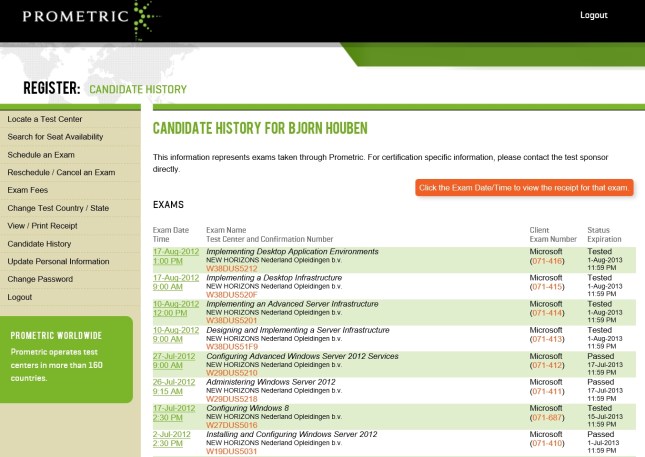
I’m still waiting for the results of the other 5 beta exams *fingers crossed*, but I couldn’t have wished for a better start 🙂
PS: For more information about Windows 8 and Windows Server 2012, be welcome to check my “Microsoft Information Flood” post. I’m a bit behind on updates, but it should still prove to be a valuable resource.
Tags: 070-410, 070-411, 070-412, 070-413, 070-414, 070-415, 070-416, 070-687, 071-410, 071-411, 071-412, 071-413, 071-414, 071-415, 071-416, 071-687, Beta, certification, Exam, MCSA, MCSA Windows Server 2012, MCSE Windows Server 2012, Prometric, Windows, Windows 2012, Windows 2012 Server, Windows 8, Windows Server 2012
Office 365 has been available for quite some time and there have also been two exams available:
70-321 Deploying Office 365
70-323 Administering Office 365
These exams focussed on larger enterprises and features corresponding with this use. More information about these exams can be found in my previous blog post. Keep in mind however that Office 365 is an ever evolving service and that things might have been changed since I wrote this blog post. Even Microsoft has retired and replaced some of their learning content.
Recently a third exam became available that focusses on smaller businesses 74-324 Administering Office 365 for Small Businesses. At the end of August a Jump Start event was held and now the recordings of this event have been made available on Technet Video.
I hope this is useful to you and that it will help you leverage Office 365 better.
Tags: 70-321, 70-323, 74-324, Exam, Exchange online, jump start, jumpstart, Lync online, Microsoft, Office 365, recording, recordings, Sharepoint online, small business, video, video recording, video recordings
When Microsoft creates new (versions of their) software, they also create new exams to become certified. Part of this process includes testing the exams, determining the passing score, getting feedback and improving the exams based on the feedback (deciding which questions to use, removing questions, re-phrasing, etc.). More information can be found here.
To get feedback, Microsoft offers access to these beta exams for free. They do this publicly using by example the born to learn blog or privately using mail to select subject matter experts (SME) based on their profiles on Microsoft Connect. So if you’re interested in taking beta exams, update the information on the Microsoft Connect site to get private invites to the latest beta exams that are relevant to you. More information about the invite procedure can be found on the Born To Learn blog. Also keep in mind that public invites might be limited using a first-come, first served principle so check on a regular basis.
Advantages and disadvantages of taking beta exams:
+ It is free if you received an invite. Nowadays you can also take beta exams if you haven’t had an invite, but then you need to pay for the exam.
+ You have a chance to become one of the first people to become certified for the new software.
+ If you pass a beta exam, you passed it legitimately because there are no answers to download online.
+ Even if you fail the beta exam, you’ve still learned a lot about the new (version of the) software.
– In general there are no books available yet and you have to get all your information from hands-on experience, blogs, technet, websites, etc.
– The time frame you have to prepare for the exams can be (very) limited. For example with the last invites for the Server 2012 beta exams I had only 2 weeks to prepare for multiple exams.
– After you’ve taken a beta exam, it might take 2-3 months before you get the result.
Beta exams I’ve taken recently include those for Windows 8, Windows Server 2012, System Center 2012 and Office 365. I expect the next beta exams to cover mainly Office 15/Office 2013 related products like by example Sharepoint, Exchange, Lync. So if you’re interested in these beta exams be sure to keep a close eye on the beta exams and start working with and learning about the products already.
I hope this was informative and that it well help you and/or your company gain a competitive advantage.
Tags: Beta, certification, certified, certify, Exam, Exchange, Learning, Lync, Microsoft, microsoft learning, Office, Office 365, Sharepoint, sme, subject matter expert, System Center, Windows, Windows 2012, Windows 2012 Server, Windows 8, Windows Server 2012
Since Microsoft has recently released their latest server OS calles Windows Server 2012, they’re hosting free one day “IT Camps Windows Server 2012” events.
Check the link below for more information about the event contents, dates and locations:
http://www.microsoft.com/netherlands/evenementen/event.aspx?eventid=675&date=20121016&eventtype=TechNet#locations
I’ve attended an IT camp for Hyper-V in Server 2008 R2 in the past and I liked the concept. Back then however there were some points of improvements with regards to preparation and the number of attendees that could actively participate in the hands-on labs. I have learned from this experience and will not miss out on this again.
I’m going to attend the Eindhoven event on the 16th of October, so please let me know if you’re attending this event as well so we can meet up.
PS: For participating in the hands-on labs you need to bring your own laptop that meets the requirements stated in the event description.
Tags: Active Directory, AD, Cluster, Clustering, DAC, Dynamic Access Control, Eindhoven, Event, Events, Free, hans-on, Hyper-V, Info Support, IT Camp, IT Camp Windows Server 2012, lab, labs, Master IT, Master IT Training, Microsoft, Powershell, Server Manager, Storage Spaces, The Netherlands, Training, Windows 2012, Windows 2012 Server, Windows Server 2012


 blog.bjornhouben.com