Last week I got a beta exam invite for exam “70-688 Managing and Maintaining Windows 8” (in beta it is 71-688). As with most beta exams lately, you only have max two weeks to prepare and there are no books available yet that you can use to study. Therefore I start with looking at what skills are being measured and if there are preparation guides available. From there on I start looking for relevant learning resources for each subject and adding them to the skills that are being measured for easy future reference.
I hope it is useful for you as well.
Read the rest of this entry »
Tags: 070-688, 071-688, 70-688, 71-688, ACT, Action center, AEM, Agentless Exception Monitoring, App-V, App-V 5.0, application compatibility toolkit, application reputation, Application Virtualization, Applocker, asset, asset inventory, authentication, Azure, backup, bcdboot, bcdedit, Beta, biometrics, BitLocker, BranchCache, certificate, client hype-rv, CMAK, computer inventory report, ConfMgr, ConfMgr 2012, ConfMgr2012, Connection Manager, Connection Manager Administration Kit, DaRT, DaRT 8, DCA, DEM, deployment strategy, Desktop Error Monitoring, Diagnostic and Recovery Toolkit, DirectAccess, DirectAccess Connectivity Assistant, disk image, disk image backup, DISM, DNSSEC, domain, EAS, EFS, EHD, Encrypted Hard Drive, Encrypting File System, Endpoint Protection, Exam, Exchange Active Sync, Exchange Activesync, file history, find and fix problems with devices, Firewall, folder redirection, group policy, hardware, hardware and devices troubleshooter, high-touch, Hyper-V, image, IPv4, IPv6, Learning, learning resource, learning resources, lite-touch, Live Mesh, live service, live services, LiveMesh, local account, Managing and Maintaining Windows 8, MBAM, MDOP, MDOP 2011 R2, metered network, metering, metro application, microsoft account, Microsoft Application Virtualization, Microsoft Azure, Microsoft Bitlocker Administration and Monitoring, Microsoft Desktop Optimization Pack, migrate, migration, mobile, mobile device, mobile device management, multifactor authentication, name resolution, native boot, Near Field Communication, network, network metering, NFC, off-network, Office 365, Office 365 Desktop Setup, offline files, Packaged App, PC refresh, PC reset, picture password, Powershell, PowerShell Remoting, prep guide, preparation, preparation guide, prepare, print management, printer, rdp, RDS, Recimg, Recimg.exe, recovery drive, recovery media, remote access, remote desktop protocol, Remote Desktop Services, Remote Server Administration Tools, RemoteApp, removable storage devices, report, roaming profiles, roaming user profiles, RSAT, SCCM 2012, SCCM2012, Secure SIM, security, shim, sideload, sideloader, Skydrive, Skydrive Pro, smart card, Software Restriction Policies, SRP, Storage Spaces, study, Sync center, System Center, System Center 2012, System Center 2012 Endpoint Protection, System Center 2012 Endpoint Protection client, System Center Configuration Manager, System Center Configuration Manager 2012, System Center Desktop Error Monitoring, System Center Endpoint Protection, system restore, trust, trust relationship, Trusted PC, two-factor authentication, UE-V, upgrade, upgrade path, User Experience Virtualization, user state migration tool, usmt, VDI, vhd, Virtual Desktop Infrastructure, virtual hard disk, virtualization, VPN, wet, Windows, Windows 7 file recovery, Windows 8, windows 8 application, Windows 8 FIle History, Windows 8 Image, Windows 8 PC refresh, Windows 8 PC reset, windows 8 upgrade path, Windows Azure, Windows Defender, windows easy transfer, Windows Firewall, Windows Intune, Windows Recovery Environment, Windows store, Windows To Go, Windows Update, wireless, workgroup, WRE, WSUS, zero-touch
Today I attended the free “IT Camps Windows Server 2012” event in Eindhoven at Master-it in Eindhoven and I really liked it. It was a real hands-on IT Camp in which they tell you some interesting things about Server 2012, while you are also able to immediately use the technologies you learn about. Ofcourse it’s also a great work to get to know new interesting people.
They also used feedback from previous IT Camps very well. This was very noticeable because now everyone was able to join the hands-on labs. Because of better preparations there was also still plenty of time to explore all assignments and go into more details.
Many thanks to Tony Krijnen and Daniel van Soest from Microsoft for this great event.
There are still IT Camp events planned, but I don’t know if you can still register for them. Check the link below for more information about the event contents, dates and locations:
http://www.microsoft.com/netherlands/evenementen/event.aspx?eventid=675&date=20121016&eventtype=TechNet#locations
Tags: Active Directory, AD, Cluster, Clustering, DAC, Dynamic Access Control, Eindhoven, Event, Events, Free, hans-on, Hyper-V, Info Support, IT Camp, IT Camp Windows Server 2012, lab, labs, Master IT, Master IT Training, Powershell, Server Manager, Storage Spaces, The Netherlands, Training, Windows 2012, Windows 2012 Server, Windows Server 2012
In Server 2012, Storage Spaces has been added. It allows you to pool multiple physical disks together (regardless of disk size and connection type) as one big logical disk. For those people familiar with Windows Home Server (WHS), the concept is similar to Drive Extender. For more information read the Storage Spaces FAQ or this blog post.
After the Storage Pool has been created, you can create one or more Storage Spaces (virtual disks) and configure them as either a simple volume, mirror volume or parity (software raid).
Even though this seems great in theory, in reality the write performance on a parity volume is painfully slow at about 25-30 MB/s. Besides the performance, there are also other aspects that you might not appreciate. So before implementing this in a production environment, test it extensively in a testing environment. You can also play around in Microsoft’s virtual labs.
It’s a pity Storage Spaces didn’t meet my expecations, because I was really looking forward to replace my Windows Home Server with Drive Extender. But for now I would recommend sticking with hardware RAID solutions.
Tags: drive extender, ICT, Microsoft, raid, Server, storage, storage pools, Storage Spaces, Windows, Windows 2012, Windows 8, windows home server, Windows Server, Windows Server 2012
Currently, there are many technological advancements taking place every day. To keep up with them is already very hard. To make it a bit easier I use RSS feeds to quickly filter what I think might be of importance to me.
A list of the RSS feeds I currently use can be found here , but you can also download an XML export of my RSS feeds here for easy import to your preferred RSS reader (assuming it supports XML import). I also advise you to check Microsoft’s RSS feed index so you can customize it to your own needs.
I personally use Google Reader for my RSS feeds because then my RSS feeds will be accessible from everywhere as long as I have a browser and an internet connection. When you are often on the road without an active internet connection, a dedicated client with cached articles from the RSS feed might also come in handy.
PS: The Microsoft blog rss feed had many articles added daily and can be hard to keep up with, but you can pretty quickly weed out duplicate articles and articles in foreign languages.
I hope this has been helpful to you.
Tags: bookmark, bookmarks, Cloud, developments, ESX, ESXi, favorite, favourite, gadget, Gadgets, ICT, Microsoft, news, rss, rss feed, technology, virtualization, VMware, vSphere, web site, web sites, website, websites, Windows
Microsoft is hosting a free jump start for those looking to upgrade their current Windows 2008 certification by taking exam “70-417 Upgrading Your Skills to MCSA Windows Server Windows Server 2012”.
I’ve attended some jump starts in the pasts and I really like them, so don’t miss out. Even though I’m already certified, I will be attending it as well. You will always learn new stuff AND you get the chance to get answers to any questions you still have.
Tags: 70-417, 70-417 Upgrading Your Skills to MCSA Windows Server Windows Server 2012, Free, jump start, Server, Upgrading Your Skills to MCSA Windows Server Windows Server 2012"., Windows, Windows 2012, Windows 2012 Server, Windows Server 2012
Besides getting “MCSA: Windows Server 2012” certified , I also passed my Windows 8 exam “70-687 Configuring Windows 8“.
I’m still waiting for the results of 4 beta exams and hope I can pass them and get these certifications:
To be continued ……
PS: For more information about Windows 8 and Windows Server 2012, be welcome to check my “Microsoft Information Flood” post. I’m a bit behind on updates, but it should still prove to be a valuable resource.
Tags: 070-410, 070-411, 070-412, 070-413, 070-414, 070-415, 070-416, 070-687, 071-410, 071-411, 071-412, 071-413, 071-414, 071-415, 071-416, 071-687, Beta, certification, Exam, MCSA, MCSA Windows Server 2012, MCSE Windows Server 2012, Prometric, Windows, Windows 2012, Windows 2012 Server, Windows 8, Windows Server 2012
After desperately checking if my results were in for the beta exams I took, I finally got the great news that I passed the first three beta exams for Windows Server 2012. This means I’m now officially “MCSA: Windows Server 2012” certified.
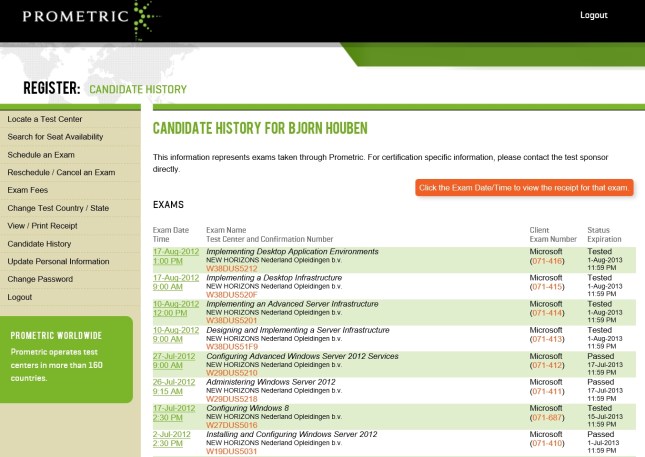
I’m still waiting for the results of the other 5 beta exams *fingers crossed*, but I couldn’t have wished for a better start 🙂
PS: For more information about Windows 8 and Windows Server 2012, be welcome to check my “Microsoft Information Flood” post. I’m a bit behind on updates, but it should still prove to be a valuable resource.
Tags: 070-410, 070-411, 070-412, 070-413, 070-414, 070-415, 070-416, 070-687, 071-410, 071-411, 071-412, 071-413, 071-414, 071-415, 071-416, 071-687, Beta, certification, Exam, MCSA, MCSA Windows Server 2012, MCSE Windows Server 2012, Prometric, Windows, Windows 2012, Windows 2012 Server, Windows 8, Windows Server 2012
When Microsoft creates new (versions of their) software, they also create new exams to become certified. Part of this process includes testing the exams, determining the passing score, getting feedback and improving the exams based on the feedback (deciding which questions to use, removing questions, re-phrasing, etc.). More information can be found here.
To get feedback, Microsoft offers access to these beta exams for free. They do this publicly using by example the born to learn blog or privately using mail to select subject matter experts (SME) based on their profiles on Microsoft Connect. So if you’re interested in taking beta exams, update the information on the Microsoft Connect site to get private invites to the latest beta exams that are relevant to you. More information about the invite procedure can be found on the Born To Learn blog. Also keep in mind that public invites might be limited using a first-come, first served principle so check on a regular basis.
Advantages and disadvantages of taking beta exams:
+ It is free if you received an invite. Nowadays you can also take beta exams if you haven’t had an invite, but then you need to pay for the exam.
+ You have a chance to become one of the first people to become certified for the new software.
+ If you pass a beta exam, you passed it legitimately because there are no answers to download online.
+ Even if you fail the beta exam, you’ve still learned a lot about the new (version of the) software.
– In general there are no books available yet and you have to get all your information from hands-on experience, blogs, technet, websites, etc.
– The time frame you have to prepare for the exams can be (very) limited. For example with the last invites for the Server 2012 beta exams I had only 2 weeks to prepare for multiple exams.
– After you’ve taken a beta exam, it might take 2-3 months before you get the result.
Beta exams I’ve taken recently include those for Windows 8, Windows Server 2012, System Center 2012 and Office 365. I expect the next beta exams to cover mainly Office 15/Office 2013 related products like by example Sharepoint, Exchange, Lync. So if you’re interested in these beta exams be sure to keep a close eye on the beta exams and start working with and learning about the products already.
I hope this was informative and that it well help you and/or your company gain a competitive advantage.
Tags: Beta, certification, certified, certify, Exam, Exchange, Learning, Lync, Microsoft, microsoft learning, Office, Office 365, Sharepoint, sme, subject matter expert, System Center, Windows, Windows 2012, Windows 2012 Server, Windows 8, Windows Server 2012
Since Microsoft has recently released their latest server OS calles Windows Server 2012, they’re hosting free one day “IT Camps Windows Server 2012” events.
Check the link below for more information about the event contents, dates and locations:
http://www.microsoft.com/netherlands/evenementen/event.aspx?eventid=675&date=20121016&eventtype=TechNet#locations
I’ve attended an IT camp for Hyper-V in Server 2008 R2 in the past and I liked the concept. Back then however there were some points of improvements with regards to preparation and the number of attendees that could actively participate in the hands-on labs. I have learned from this experience and will not miss out on this again.
I’m going to attend the Eindhoven event on the 16th of October, so please let me know if you’re attending this event as well so we can meet up.
PS: For participating in the hands-on labs you need to bring your own laptop that meets the requirements stated in the event description.
Tags: Active Directory, AD, Cluster, Clustering, DAC, Dynamic Access Control, Eindhoven, Event, Events, Free, hans-on, Hyper-V, Info Support, IT Camp, IT Camp Windows Server 2012, lab, labs, Master IT, Master IT Training, Microsoft, Powershell, Server Manager, Storage Spaces, The Netherlands, Training, Windows 2012, Windows 2012 Server, Windows Server 2012


 blog.bjornhouben.com