Introduction
Even though Windows 8 has been available for quite some time for IT pros and developers, it is now available for the general public as well.
Microsoft has also released its own Windows RT based tablet (Microsoft Surface) in some countries and is expected to release a Windows 8 based tablet (Microsoft Surface Pro) within the next three months. For more information about Windows tablets and the differences between Windows RT and Windows 8, read my previous blog post.
Read the rest of this entry »
Tags: all in one, convertible, desktop, Free, laptop, limited time, limited time offer, Microosft Surface, Microsoft, offer, slider, surface, tablet, ultra portable, ultraportable, upgrade, Windows, Windows 8, Windows 8 Enterprise, Windows 8 Media Center Pack, Windows 8 Pro, Windows RT
[Update 14-12-2013]
It’s been more than a year since my initial post, so here are some updates from my point of view:
- Tablets and ultrabooks are coming closer together due to all the available form factors. Tablet, clam shell, slider, convertible, dockable / detachable, etc. This provides more choice, but makes it also harder for people to choose the device that is most appropriate for them.
- Cheaper Windows 8.1 based tablets (based on the new Intel Atom processors) have become available that make it a more viable alternative to Android and iOS based tablets.
- Windows tablets based on AMD processors seemed interesting to me last year because of their added graphical power, but they didn’t seem to get any traction up until now.
- High end Windows based tablets (Intel Core i5/i7 based) are still relatively expensive.
- Many companies that previously produced Windows RT tablets, stopped making them (Asus, Samsung, HP, Lenovo, HTC. The only companies that are still producting Windows RT tablets are Microsoft, Nokia (largely backed by Microsoft) and Dell.
- Rumours are floating around that Microsoft will be reducing the number of Windows versions and in my opinion it would make sense to get rid of Windows RT.
- The new and improved Intel Atom (quad core processors) are making ARM based Windows RT devices even less interesting because they provide better performance and use less energy than the previous versions while allowing people to run x86 programs.
- Windows tablets have become available in smaller sizes (8 inch) and Windows 8.1 and Windows RT 8.1 have updated to better work with this.
- Windows 8.1 and Windows RT 8.1 have been released and many minor adjustments made it more tablet optimized.
- Most major apps have been released as a “Metro”/Modern app for Windows 8 / Windows RT, but it’s still lagging behind Google’s Play Store and the Apple App Store.
- The graphical performance included in processors is increasing, reducing the need for seperate GPUs for generic use and bringing more options for apps.
- Google Android based tablets are still going strong and provide a lot of bang for buck. Also the Android OS is still getting many useful updates. Security and OS version sprawl is still an issue though, especially in the enterprise. Also there’s a big gap in user experience because there are still very cheap tablets with lots of disadvantages, while the normal and high end models are very good in general.
- The Apple iPad (hardware) and operating system (iOS) received updates and they’re still doing very well what they’ve always done while providing great stability and improving battery time and performance. To me however it’s more of the same without much added value over previous versions. I’m curious to see if, how and when Apple will make their devices more popular for people that want to be able to do more. Maybe some kind power tablet running OS X with touch and iOS options ?
If you have something to add or if you think something that’s incorrect, please leave a comment.
[Update 14-12-2013]
Since I’m seriously considering buying a Windows based tablet, I’ve been very closely following all developments. Even though a lot of information has become available, it’s often spread across many different websites and articles and is often incomplete in my opinion. Since the Microsoft Surface RT tablet is available for pre-order and will be sold when Windows 8 will be available on the 26th of October I decided to write this article.And even though a lot of people have complained about this on various sites, most sites don’t have one article that covers all the things to look out for. In this post I try to do just that. One of the most useful resources I’ve used are the articles from Paul Thurrott on his website supersite for windows.
Also it’s not just consumers that are having trouble understanding / explaining the differences between Windows RT and Windows 8 tablets though, Microsoft employees are also still being trained to properly handle questions.
In this post it’s important to realize that Microsoft Surface RT is not the same as Windows RT, Microsoft Surface RT is a tablet from Microsoft (hardware) that runs Windows RT (software). Microsoft Surface Pro is another tablet from Microsoft (hardware) that runs Windows 8 (software).
Read the rest of this entry »
Tags: android, Apple, apps, Google, hardware, ICT, iOS, iPad, Microsoft, Microsoft Surface, Microsoft Surface Pro, Microsoft Surface RT, Office 2013 RT, tablet, Windows 8, Windows 8 Enterprise, Windows 8 Pro, Windows 8.1, Windows RT, Windows RT 8.1
Last week I got a beta exam invite for exam “70-688 Managing and Maintaining Windows 8” (in beta it is 71-688). As with most beta exams lately, you only have max two weeks to prepare and there are no books available yet that you can use to study. Therefore I start with looking at what skills are being measured and if there are preparation guides available. From there on I start looking for relevant learning resources for each subject and adding them to the skills that are being measured for easy future reference.
I hope it is useful for you as well.
Read the rest of this entry »
Tags: 070-688, 071-688, 70-688, 71-688, ACT, Action center, AEM, Agentless Exception Monitoring, App-V, App-V 5.0, application compatibility toolkit, application reputation, Application Virtualization, Applocker, asset, asset inventory, authentication, Azure, backup, bcdboot, bcdedit, Beta, biometrics, BitLocker, BranchCache, certificate, client hype-rv, CMAK, computer inventory report, ConfMgr, ConfMgr 2012, ConfMgr2012, Connection Manager, Connection Manager Administration Kit, DaRT, DaRT 8, DCA, DEM, deployment strategy, Desktop Error Monitoring, Diagnostic and Recovery Toolkit, DirectAccess, DirectAccess Connectivity Assistant, disk image, disk image backup, DISM, DNSSEC, domain, EAS, EFS, EHD, Encrypted Hard Drive, Encrypting File System, Endpoint Protection, Exam, Exchange Active Sync, Exchange Activesync, file history, find and fix problems with devices, Firewall, folder redirection, group policy, hardware, hardware and devices troubleshooter, high-touch, Hyper-V, image, IPv4, IPv6, Learning, learning resource, learning resources, lite-touch, Live Mesh, live service, live services, LiveMesh, local account, Managing and Maintaining Windows 8, MBAM, MDOP, MDOP 2011 R2, metered network, metering, metro application, microsoft account, Microsoft Application Virtualization, Microsoft Azure, Microsoft Bitlocker Administration and Monitoring, Microsoft Desktop Optimization Pack, migrate, migration, mobile, mobile device, mobile device management, multifactor authentication, name resolution, native boot, Near Field Communication, network, network metering, NFC, off-network, Office 365, Office 365 Desktop Setup, offline files, Packaged App, PC refresh, PC reset, picture password, Powershell, PowerShell Remoting, prep guide, preparation, preparation guide, prepare, print management, printer, rdp, RDS, Recimg, Recimg.exe, recovery drive, recovery media, remote access, remote desktop protocol, Remote Desktop Services, Remote Server Administration Tools, RemoteApp, removable storage devices, report, roaming profiles, roaming user profiles, RSAT, SCCM 2012, SCCM2012, Secure SIM, security, shim, sideload, sideloader, Skydrive, Skydrive Pro, smart card, Software Restriction Policies, SRP, Storage Spaces, study, Sync center, System Center, System Center 2012, System Center 2012 Endpoint Protection, System Center 2012 Endpoint Protection client, System Center Configuration Manager, System Center Configuration Manager 2012, System Center Desktop Error Monitoring, System Center Endpoint Protection, system restore, trust, trust relationship, Trusted PC, two-factor authentication, UE-V, upgrade, upgrade path, User Experience Virtualization, user state migration tool, usmt, VDI, vhd, Virtual Desktop Infrastructure, virtual hard disk, virtualization, VPN, wet, Windows, Windows 7 file recovery, Windows 8, windows 8 application, Windows 8 FIle History, Windows 8 Image, Windows 8 PC refresh, Windows 8 PC reset, windows 8 upgrade path, Windows Azure, Windows Defender, windows easy transfer, Windows Firewall, Windows Intune, Windows Recovery Environment, Windows store, Windows To Go, Windows Update, wireless, workgroup, WRE, WSUS, zero-touch
After some technical difficulties the “Windows 8 for IT Pros Jumpstart” started about 50 minutes later than planned. For people new to Windows 8 I think that Stephen Rose and Joey Snow covered most of the important features that are relevant for enterprises. For me personally however, it was mostly repetition since I’m already very familiar with Windows 8.
The recorded videos are available now as well: http://technet.microsoft.com/en-US/windows/jj687764.aspx
Nevertheless, for people who are interested, I’ve saved the chat / Q&A from the jump start which also includes a lot of links to use if you want to know more about specific features.
Some links from the Q&A include:
For people who are either struggling with the new user interface themselves or expect their family, friends, colleagues or customers to struggle, I suggest you take a look at my previous blog post.
If you’ve missed this event, it has been recorded and will probably be posted online somewhere in the next two weeks.
Also for those who are looking to upgrade their certification to Server 2012, next week there’s another jumpstart “Prepare for exam 70-317 – Upgrading Skills to Windows Server 2012 Jumpstart”. I hope to see you there.
Tags: Free, ICT, Joey Snow, jump start, jumpstart, Learning, Stephen Rose, Windows, Windows 8, windows for IT Pros
Yesterday I received an e-mail that I was eligable to register for the beta exam:
“71-688 Managing and Maintaining Windows 8”
The beta exam period runs from Oct 17 – Oct 31 and I will personally take the exam next week. It is free for those who received the beta invite. If you didn’t receive the beta invite,you can still register through the prometric website, but it will not be free. If you want to get access to future beta exams, read one of my previous blog posts.
Normally the preparation guide is published on the microsoft learning website, but apparently they’re experiencing a delay. Therefore the preparation guide has now been posted on the born to learn blog:
http://borntolearn.mslearn.net/btl/b/weblog/archive/2012/10/16/where-39-s-the-71-688-prep-guide.aspx
For all people taking the exam, good luck!
Tags: 070-688, 071-688, 70-688, 71-688, Beta, certification, Exam, MCSA, mcsa windows 8, Windows, Windows 8
In Server 2012, Storage Spaces has been added. It allows you to pool multiple physical disks together (regardless of disk size and connection type) as one big logical disk. For those people familiar with Windows Home Server (WHS), the concept is similar to Drive Extender. For more information read the Storage Spaces FAQ or this blog post.
After the Storage Pool has been created, you can create one or more Storage Spaces (virtual disks) and configure them as either a simple volume, mirror volume or parity (software raid).
Even though this seems great in theory, in reality the write performance on a parity volume is painfully slow at about 25-30 MB/s. Besides the performance, there are also other aspects that you might not appreciate. So before implementing this in a production environment, test it extensively in a testing environment. You can also play around in Microsoft’s virtual labs.
It’s a pity Storage Spaces didn’t meet my expecations, because I was really looking forward to replace my Windows Home Server with Drive Extender. But for now I would recommend sticking with hardware RAID solutions.
Tags: drive extender, ICT, Microsoft, raid, Server, storage, storage pools, Storage Spaces, Windows, Windows 2012, Windows 8, windows home server, Windows Server, Windows Server 2012
Op 26 oktober wordt Windows 8 officieel gereleased door Microsoft. Vanaf dat moment zullen nieuwe pc’s en laptops ook standaard uitgeleverd gaan worden met Windows 8. Tevens zullen dan ook Windows 8 (RT) tablets beschikbaar komen. Zowel Microsoft zelf zal tablets verkopen (Microsoft Surface), maar ook andere grote leveranciers zullen hun eigen tablets verkopen. Ook is het de verwachting dat er steeds meer laptops met touchscreen zullen gaan komen.
Het gevolg hiervan is dat Windows 8 qua bediening enorm verandert.
Ik raad daarom ook iedereen aan met interesse in deze nieuwe versie van Windows om de “HCC Windows 8 introductiebijeenkomst” in Urmond bij te wonen:
Datum : Vrijdag 12 oktober 2012
Tijd : 20:00 – 22:00
Locatie: Gemeenschapshuis Pater Kolbe, Graetheidelaan 60, 6129 GH Urmond
Link: http://www.hcc.nl/vereniging/evenement/windows-8-introductietraining-33
Tags: hcc, hcc.nl, introductie, Learning, Training, urmond, Windows, Windows 8, www.hcc.nl
Besides getting “MCSA: Windows Server 2012” certified , I also passed my Windows 8 exam “70-687 Configuring Windows 8“.
I’m still waiting for the results of 4 beta exams and hope I can pass them and get these certifications:
To be continued ……
PS: For more information about Windows 8 and Windows Server 2012, be welcome to check my “Microsoft Information Flood” post. I’m a bit behind on updates, but it should still prove to be a valuable resource.
Tags: 070-410, 070-411, 070-412, 070-413, 070-414, 070-415, 070-416, 070-687, 071-410, 071-411, 071-412, 071-413, 071-414, 071-415, 071-416, 071-687, Beta, certification, Exam, MCSA, MCSA Windows Server 2012, MCSE Windows Server 2012, Prometric, Windows, Windows 2012, Windows 2012 Server, Windows 8, Windows Server 2012
After desperately checking if my results were in for the beta exams I took, I finally got the great news that I passed the first three beta exams for Windows Server 2012. This means I’m now officially “MCSA: Windows Server 2012” certified.
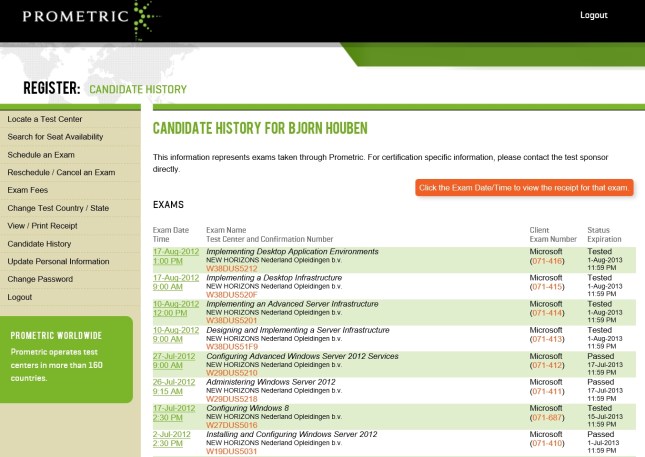
I’m still waiting for the results of the other 5 beta exams *fingers crossed*, but I couldn’t have wished for a better start 🙂
PS: For more information about Windows 8 and Windows Server 2012, be welcome to check my “Microsoft Information Flood” post. I’m a bit behind on updates, but it should still prove to be a valuable resource.
Tags: 070-410, 070-411, 070-412, 070-413, 070-414, 070-415, 070-416, 070-687, 071-410, 071-411, 071-412, 071-413, 071-414, 071-415, 071-416, 071-687, Beta, certification, Exam, MCSA, MCSA Windows Server 2012, MCSE Windows Server 2012, Prometric, Windows, Windows 2012, Windows 2012 Server, Windows 8, Windows Server 2012


 blog.bjornhouben.com